- AI at Generative AI
- Teknolohiya at Programming
- Negosyo at Pagnenegosyo
- Digital Marketing
- Microsoft Office at Produktibidad
- Datos at Pagsusuri
- Pananalapi at Pagtutuos
- Disenyo at Malikhaing Kasanayan
- Karera at Propesyonal na Pag-unlad
- Freelance at Malayuang Trabaho
- Paano at Estilo
- Edukasyon at Pagtuturo
- Pananampalataya
Learn how AI chatbots work, from prompts and tokens to context, language models and generated responses, with a simple beginner-friendly explanation.
09/18/26 • 792 Mga view

How Do AI Chatbots Like ChatGPT Actually Work? A Beginner’s Guide
You type a question into a chat box.
A few seconds later, an AI responds with an explanation, writes something for you, summarizes a document, or helps solve a problem.
But what is actually happening behind that simple conversation?
How can a computer respond to questions that seem to require understanding?
The answer involves several technologies working together, including large language models (LLMs), prompts, context, tokenization, machine learning, and software systems built around the model.
You don't need to be a programmer or AI researcher to understand the basics.
In this guide, we'll walk through how AI chatbots work, what happens when you send a message, why they sometimes make mistakes, and what makes modern AI assistants different from traditional chatbots.
What Is an AI Chatbot?
An AI chatbot is a software application that uses artificial intelligence to communicate with users through natural language.
Instead of requiring you to click through menus or learn specific commands, you can interact with the system by typing or speaking naturally.
For example, you might ask:
"Explain photosynthesis in simple terms."
Or:
"Help me create a study schedule."
The chatbot processes your request and generates a response.
Some AI chatbots can do much more than simple conversation. Depending on the system, they may be able to work with documents, images, code, web information, or external tools.
This is one of the major differences between modern AI assistants and the simple rule-based chatbots many people encountered years ago.
How Did Traditional Chatbots Work?
To understand modern AI chatbots, it helps to look at older chatbot technology.
Traditional chatbots often relied heavily on predefined rules.
For example, a basic customer-service chatbot might be programmed with rules such as:
- If the user says "opening hours," show the business hours.
- If the user says "contact," show the contact page.
- If the user asks about delivery, display delivery information.
This approach can work well for predictable questions.
But it becomes difficult when users phrase questions in unexpected ways.
Imagine a chatbot was programmed to recognize:
"What time do you close?"
A user might instead write:
"Are you still open tonight?"
A rigid rule-based system might not recognize that both questions are asking about the same thing.
Modern AI chatbots can handle a much wider variety of language because they use machine-learning models capable of recognizing patterns in language.
How Modern AI Chatbots Work
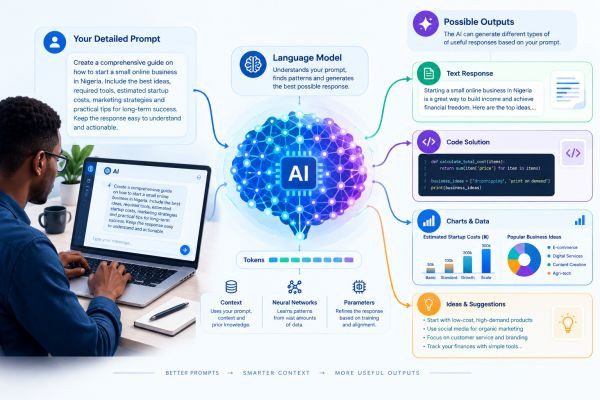
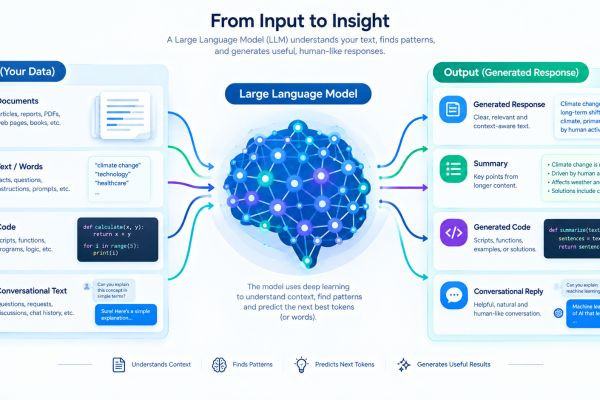
A simplified version of the process looks like this:
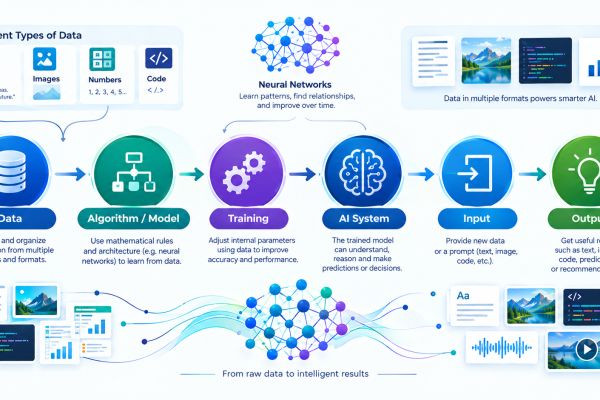
User message → Input processing → Context → AI model → Generated tokens → Response → User
There can be many additional components depending on the application.
Let's break this down.
1. You Send a Message
Everything starts with your input.
This could be:
- A question
- An instruction
- A paragraph
- A request to summarize something
- A programming problem
- A document
- An image, depending on the system
- A combination of different types of information
Your input is commonly called a prompt.
For example:
"Explain artificial intelligence to a 12-year-old."
The system first needs to convert your request into a form that its underlying model can process.
2. Your Message Is Converted Into Tokens
Language models generally process text using tokens.
A token can represent a complete word, part of a word, punctuation, or another piece of text depending on the tokenizer being used.
So your sentence isn't necessarily treated by the model as one complete object.
It is broken into smaller units that the model can process.
The model then uses these tokens, along with the available context, to generate its response.
This is one reason token limits are important when dealing with very long conversations or documents.
3. The Chatbot Adds Context
Your latest message isn't always the only information the system considers.
A conversational AI system may provide the underlying model with additional context.
That context could include:
- Earlier messages
- System instructions
- Developer instructions
- Information you supplied earlier
- Retrieved documents
- Tool results
- Other application-specific information
For example, suppose you say:
"Tell me more about it."
That sentence is difficult to understand on its own.
But if the previous conversation was about artificial intelligence, the chatbot can use the conversation context to determine what "it" probably refers to.
This ability to work with context is an important part of conversational AI.
4. The AI Model Processes the Input
The prepared input is then passed to the underlying AI model.
For many modern AI chatbots, this involves a large language model.
The model analyzes the sequence of tokens and the context available to it.
It doesn't simply look up a sentence from a giant answer database.
Instead, it uses patterns learned during training to determine what response it should generate.
This is a key concept.
The model generates an answer rather than simply retrieving a prewritten response.
5. The Model Predicts What Comes Next
A language model can generate text by predicting tokens based on the preceding context.
Imagine you write:
"The largest planet in our solar system is..."
The model can assign probabilities to possible next tokens.
A token corresponding to "Jupiter" would be highly relevant in this context.
The process then continues.
The model generates another token, then another, gradually constructing a response.
This happens extremely quickly, which makes the interaction feel like a conversation.
6. The Response Is Turned Back Into Readable Text
The generated tokens are converted into text that you can read.
The chatbot's interface then displays the response.
From your perspective, it might look like:
You: How does AI work?
AI: Artificial intelligence works by using algorithms and models to process information and produce outputs...
Underneath that simple exchange is a much more complicated computational process.
Does the AI Search the Internet Every Time?
Not necessarily.
This is an important distinction.
An AI chatbot can generate a response from the model and the information provided in its context without performing a web search.
However, some AI systems can use external tools such as:
- Web search
- Databases
- Calculators
- Code execution
- File retrieval
- APIs
- Specialized software
When an external search or tool is available and used, the chatbot may incorporate information from that tool into its response.
Therefore, you should not automatically assume that every answer from an AI chatbot came from a live internet search.
AI Chatbots and Retrieval-Augmented Generation
You may eventually come across the term RAG, which stands for Retrieval-Augmented Generation.
It describes a setup in which an AI system retrieves relevant information from an external source and provides that information to a language model as context for generating a response.
Imagine a company has thousands of internal documents.
Instead of expecting the language model to have every document stored in its learned parameters, a system could:
Question → Search company documents → Retrieve relevant information → Give information to model → Generate answer
This can be particularly useful for:
- Company knowledge bases
- Customer support
- Internal documentation
- Research
- Product information
- Large collections of documents
RAG does not magically guarantee that the answer will be correct. The retrieved information and the generated response still need appropriate evaluation.
Why Does an AI Chatbot Remember Earlier Messages?
When you have a long conversation with an AI assistant, it can sometimes refer to things you mentioned earlier.
This may create the impression that the AI has a human-like memory.
The reality is more technical.
A chatbot can use conversation history or other application-level memory features to provide relevant information to the model.
For example:
User: My business sells online courses.
Later:
User: Give me five marketing ideas.
The system may use the earlier information about the business as part of the context.
But "conversation context" and "human memory" are not the same thing.
Different AI products also implement memory and conversation history differently.
Why Does an AI Chatbot Sometimes Forget Something?
If the system has access to a limited amount of context, older parts of a conversation may not always remain available in the same way.
Other factors can also affect what information the system uses.
For example:
- The conversation may become very long.
- The application may summarize older messages.
- Certain information may not be retained.
- The system may prioritize some instructions over others.
- Different products may have different memory features.
Therefore, saying that an AI chatbot "remembers everything" would be inaccurate.
Why Do AI Chatbots Sometimes Give Wrong Answers?
One of the most important things to understand about AI chatbots is that fluent language does not guarantee factual accuracy.
A chatbot may produce an answer that sounds highly convincing but contains an error.
This can happen because language models are designed to generate plausible sequences of tokens based on patterns and context.
They are not automatically perfect fact-checking machines.
For example, an AI might:
- State an incorrect date
- Misinterpret a question
- Invent a source
- Mix together two different facts
- Make an arithmetic mistake
- Give outdated information
- Misunderstand a technical problem
This is sometimes described as hallucination.
The practical lesson is simple:
Don't confuse confidence with accuracy.
For important information, verify the answer using reliable sources.
Why Can the Same Question Produce Different Answers?
You may notice that asking an AI chatbot the same question twice doesn't always produce exactly the same response.
There are several reasons.
The generation process can involve probabilities and sampling rather than always selecting exactly the same sequence.
Other factors can also affect the result, including:
- The wording of the prompt
- Conversation context
- System instructions
- Model version
- Generation settings
- External information or tools
This means AI responses are not necessarily deterministic in every situation.
What Is a System Prompt?
Behind the scenes, an AI application may provide instructions that users don't directly type into the chat box.
These instructions can influence how the model behaves.
They may specify things such as:
- How the assistant should respond
- What types of tasks it should perform
- Formatting requirements
- Safety rules
- Available tools
- Other application-specific behavior
These instructions are often referred to as system instructions or, in some contexts, a system prompt.
Your own prompt is therefore not necessarily the only instruction the model receives.
What Happens When You Ask for a Different Style?
One fascinating feature of modern AI chatbots is their ability to change the way they generate an answer.
For example, you could ask:
"Explain this like I'm a beginner."
Then:
"Now explain it for a software engineer."
The underlying model may be able to adjust its response based on the instructions and context.
You could also request:
- A shorter explanation
- A detailed explanation
- Bullet points
- A table
- A formal tone
- A conversational tone
- Examples
- Step-by-step instructions
This is one reason prompt quality matters.
The better you communicate the task, context and desired output, the easier it is for the model to produce something useful.
Can AI Chatbots Understand Images and Files?
Some modern AI systems are multimodal, meaning they can work with more than just text.
Depending on the particular system, this can include:
- Images
- Documents
- Audio
- Video
- Text
For example, a user might provide an image and ask:
"Describe what is shown in this picture."
Or provide a document and ask:
"Summarize the main points."
The exact capabilities depend on the AI application and model being used.
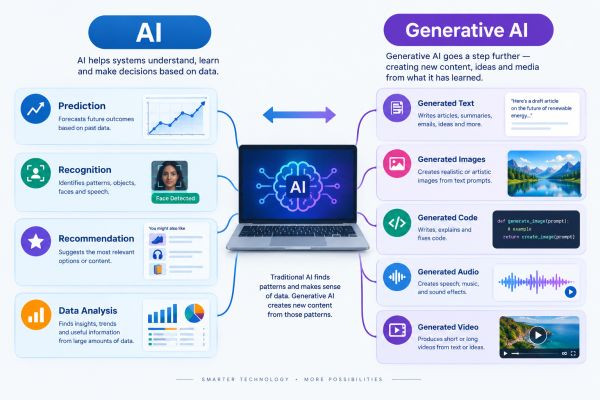
Multimodal AI represents a broader development beyond text-only language models.
How Do AI Chatbots Generate Code?
Language models can also generate programming code because their training and capabilities can include patterns found in programming languages and technical documentation.
For example, you could ask:
"Write a Python function that calculates the average of a list of numbers."
The model can generate a possible solution.
But generated code should be reviewed and tested.
A program can look perfectly reasonable while containing:
- Bugs
- Security problems
- Incorrect assumptions
- Inefficient logic
- Compatibility issues
AI can be a useful programming assistant, but it should not eliminate the developer's responsibility to understand and test the result.
Do AI Chatbots Think Like Humans?
No.
This is one of the most common misunderstandings about AI.
An AI chatbot can produce language that appears thoughtful, but this does not mean it has a human mind.
It does not automatically possess:
- Human consciousness
- Human emotions
- Personal experiences
- Human intentions
- A physical understanding of the world
Its ability to produce convincing language comes from the computational models and systems behind it.
This distinction matters because people can easily attribute human qualities to software that communicates naturally.
Why Do AI Chatbots Feel Like Conversations?
Human conversation has a predictable structure.
Someone says something.
You interpret it in context.
You respond.
The other person responds again.
Modern chatbots can imitate this structure because they process conversational context and generate responses that relate to previous messages.
The result can feel surprisingly natural.
But the conversational experience should not be confused with human consciousness.
The software is producing responses through computation.
What Happens Behind the Scenes?
A simplified modern AI chatbot might involve several components:
1. User interface
Where you type, speak or upload information.
↓
2. Input processing
The system prepares your request.
↓
3. Context management
Relevant conversation history and instructions are assembled.
↓
4. AI model
The model processes the input and generates an output.
↓
5. Tools, when available
The system may search, retrieve documents, calculate information or interact with other software.
↓
6. Response processing
The result may be formatted or filtered.
↓
7. User interface
You receive the final response.
The actual architecture can be considerably more complex, but this gives beginners a useful picture.
AI Chatbot vs Search Engine
These technologies increasingly overlap, but their traditional roles are different.
| Feature | AI Chatbot | Search Engine |
|---|---|---|
| Main function | Generate responses | Find and rank information |
| Interaction | Conversational | Search queries |
| Output | Generated response | Search results/pages |
| Context | Can use conversation context | Usually query-focused |
| External sources | May use them depending on tools | Core part of search |
| Potential weakness | Can generate inaccurate information | Search results can also contain unreliable information |
Modern systems can combine both approaches.
An AI assistant may use search to retrieve information and then use a language model to explain it conversationally.
AI Chatbot vs Traditional Chatbot
| Feature | Traditional Rule-Based Chatbot | Modern AI Chatbot |
|---|---|---|
| Main technology | Predefined rules | Machine learning/AI models |
| Language flexibility | Often limited | Generally much broader |
| Unexpected questions | May struggle | Can often handle variations |
| Content generation | Usually limited | Can generate new responses |
| Context handling | Often limited | Can be more sophisticated |
| Learning/training | Rules are explicitly programmed | Model is trained on data |
This doesn't mean traditional chatbots are useless.
For simple, predictable tasks, a rule-based system can still be appropriate.
The right technology depends on the problem.
What Are AI Chatbots Useful For?
AI chatbots can assist with many everyday tasks.
Learning
Ask for explanations, examples, practice questions and study assistance.
Writing
Brainstorm ideas, organize notes, rewrite drafts and improve clarity.
Programming
Explain code, generate examples and help troubleshoot possible problems.
Business
Draft documents, organize ideas and assist with customer-service workflows.
Research
Help organize information and identify areas that require further investigation.
Productivity
Turn rough notes into structured lists, plans or drafts.
The key is to treat the chatbot as a tool, not an unquestionable authority.
What Are the Risks of AI Chatbots?
AI chatbots bring useful capabilities, but they also introduce risks.
Inaccurate information
A chatbot can generate incorrect information.
Privacy
Users should think carefully before entering confidential or sensitive information.
Bias
AI systems can reproduce biases present in training data or other parts of their design.
Overreliance
People may become too dependent on AI for tasks that require independent judgment.
Misuse
The same technology can be used in ways that create problems for individuals, organizations or society.
Responsible use requires understanding both what AI can do and where it can fail.
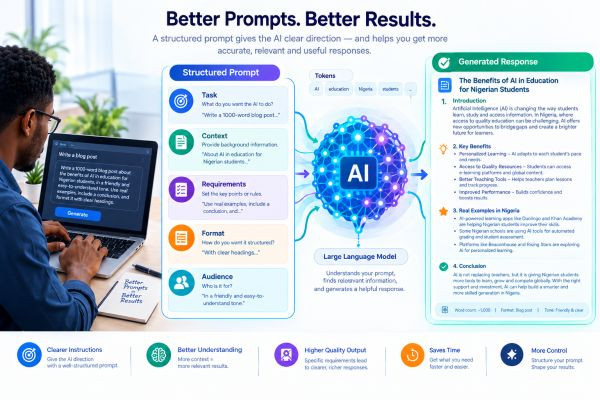
How Can You Get Better Results From an AI Chatbot?
You don't necessarily need complicated prompts.
A useful prompt usually makes several things clear.
Tell the AI what you want
Instead of:
"Marketing."
Try:
"Give me five beginner-friendly marketing ideas for an online learning platform."
Provide context
Explain the situation and relevant background.
Specify the format
For example:
"Give me the answer in a table."
Define the audience
For example:
"Explain this to someone who has never studied programming."
Ask for limitations when necessary
You can ask the AI to identify assumptions, uncertainties or areas that need verification.
These practices form the foundation of prompt engineering, which we'll explore in a later article.
Should You Trust AI Chatbots?
The better question is:
When should you verify an AI chatbot's answer?
For low-risk tasks such as brainstorming or rewriting your own text, you may primarily need to review whether the output is useful and appropriate.
For high-stakes information, verification becomes much more important.
Be especially careful with information involving:
- Money
- Legal matters
- Health
- Education
- Security
- Important business decisions
- Current events
AI can help you explore a topic, but it should not automatically replace reliable sources or qualified human judgment.
The Simple Explanation
If you want the entire article reduced to one basic process, think of an AI chatbot like this:
You send a message
↓
The system converts and prepares your input
↓
Relevant context and instructions are added
↓
An AI model processes the information
↓
The model generates tokens
↓
The system converts those tokens into a response
↓
You see the answer
↓
You can continue the conversation
That's the basic idea behind a modern conversational AI system.
The technology underneath it is far more sophisticated, but this mental model gives you a strong starting point.
Frequently Asked Questions
How does an AI chatbot work?
An AI chatbot processes a user's input, combines it with relevant context and instructions, sends the information to an AI model, and generates a response based on the model's learned patterns and available context.
Is an AI chatbot the same as an LLM?
No. An LLM is an AI model, while an AI chatbot is an application that can use an LLM and other technologies to communicate with users.
Does an AI chatbot search Google for every answer?
No. An AI chatbot can generate responses from its model and provided context without performing a web search. Some systems can use search tools when available.
Why do AI chatbots make mistakes?
Language models can generate plausible text that is not factually correct. They are not guaranteed to be accurate fact-
Mga Kaugnay na Artikulo