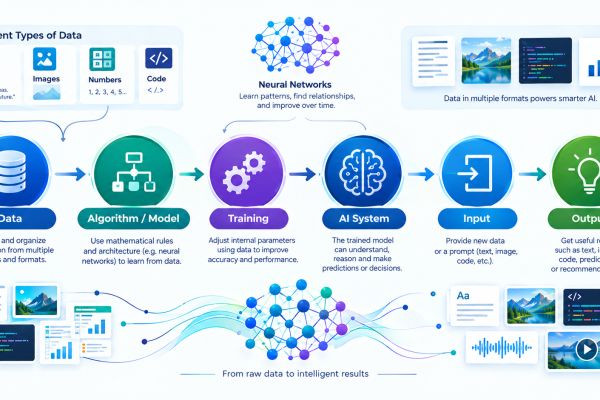
Learn prompt engineering for beginners with practical techniques, examples, templates and simple ways to write clearer prompts and get better AI results.
Suggested Category:
09/19/26 • 788 مناظر

Prompt Engineering for Beginners: How to Get Better Results From AI
You've probably noticed something when using AI: sometimes you ask a simple question and receive exactly what you wanted.
Other times, the response is too vague, too long, too generic, or simply misses the point.
Often, the difference is not the AI model itself.
It is the instruction you gave it.
That is where prompt engineering comes in.
Prompt engineering is the practice of designing and refining instructions so that an AI system is more likely to produce a useful result.
You don't need to be a programmer to learn it.
In fact, if you already know how to explain what you want clearly, you're halfway there.
This guide explains what prompt engineering means, how it works, useful techniques for beginners, common mistakes to avoid, and how to build a practical prompting workflow.
What Is Prompt Engineering?
Prompt engineering is the process of designing, testing and refining prompts to guide an AI system toward a desired output.
A prompt can be as simple as:
"Summarize this article."
Or it can be more structured:
"Summarize the following article for a beginner audience. Identify the three main arguments, explain each in simple language, and finish with five key takeaways."
Both prompts ask for a summary.
The second one gives the AI more information about the desired result.
Prompt engineering is therefore not about finding a magical sentence that makes AI perfect.
It is about communicating the task clearly and improving the instruction when the result isn't good enough.
Why Does Prompt Engineering Matter?
Modern AI systems can perform many different tasks.
The same model might help with:
- Writing
- Research
- Programming
- Learning
- Brainstorming
- Summarization
- Translation
- Data analysis
- Planning
- Content creation
But the model doesn't automatically know what you want from every interaction.
Consider these two prompts:
Prompt A:
"Write about online learning."
Prompt B:
"Write a beginner-friendly 1,000-word article explaining how online learning can help working adults develop new skills. Use practical examples, clear headings and a balanced discussion of both benefits and challenges."
The second prompt gives the system a clearer target.
That doesn't guarantee a perfect article.
But it reduces ambiguity.
Prompt Engineering Is More Than Writing Long Prompts
One common misconception is that prompt engineering means writing extremely long instructions.
That's not necessarily true.
A good prompt can be one sentence.
For example:
"Give me three simple examples of how small businesses can use AI to save time."
That's a short prompt, but the task is clear.
A complicated task may require more context.
The objective isn't:
Make the prompt as long as possible.
The objective is:
Give the AI the information it needs to perform the task properly.
The Basic Prompt Engineering Framework
A useful framework for beginners is:
Task + Context + Requirements + Format + Audience
Let's see how this works.
Task
What do you want the AI to do?
Context
What background information does it need?
Requirements
What should the response include?
Format
How should the result be presented?
Audience
Who will read or use the output?
For example:
"Create a beginner-friendly guide to saving money. The audience is young adults who are new to budgeting. Explain five practical saving habits, provide a simple monthly example, avoid complicated financial terminology, and present the tips using clear headings."
This prompt gives the AI a clear job.
1. Start With a Clear Task
The first thing your prompt should communicate is what you want done.
Use direct verbs such as:
- Explain
- Summarize
- Compare
- Rewrite
- Analyze
- Generate
- Create
- Translate
- Organize
- Extract
- Classify
- Brainstorm
For example:
Instead of:
"Artificial intelligence and education."
Try:
"Explain five ways artificial intelligence is being used in education."
The second version clearly identifies the task.
2. Provide Relevant Context
AI cannot reliably guess information you haven't provided.
Imagine asking:
"Write an email to my customer."
The AI doesn't know:
- What happened
- Who the customer is
- Why you're writing
- What outcome you want
- What tone is appropriate
Add context:
"A customer purchased an online course but has reported difficulty accessing the course dashboard. Write a polite support email explaining that we're investigating the issue and asking them to confirm the email address associated with their account."
Now the situation is clear.
Context turns a vague request into a specific one.
3. Define the Desired Outcome
Sometimes the task is clear but the goal isn't.
Compare:
"Analyze this business idea."
with:
"Analyze this business idea to identify its potential customers, revenue model, major operating challenges and questions I should investigate before investing money."
The second prompt explains what the analysis is supposed to accomplish.
Ask yourself:
What should I be able to do with the answer when I'm finished?
That question can help you write better prompts.
4. Specify the Audience
The same information may need to be explained differently to different people.
Compare:
"Explain blockchain."
with:
"Explain blockchain to a complete beginner who has never studied computer science."
Now compare:
"Explain blockchain to a software developer who already understands databases."
The subject is the same.
The level of explanation is completely different.
Whenever audience matters, tell the AI.
5. Tell AI What Format You Want
You can guide the structure of the output.
For example:
"Give me a table."
"Use bullet points."
"Create a step-by-step guide."
"Write five short paragraphs."
"Return the answer as a checklist."
"Create an outline with six main sections."
Format instructions can make the output much easier to use.
6. Set Useful Constraints
Constraints define boundaries.
For example:
"Keep the answer under 500 words."
Or:
"Give me exactly seven ideas."
Or:
"Use simple language suitable for beginners."
Or:
"Include one practical example for each point."
Constraints are especially useful when the output needs to fit a specific purpose.
However, avoid creating unnecessary restrictions.
If you tell an AI to satisfy ten different formatting rules at once, some requirements may conflict.
7. Give the AI an Example
Sometimes the easiest way to explain what you want is to show it.
Suppose you're asking AI to classify customer feedback.
You could provide examples:
"Excellent service" → Positive
"The product was okay" → Neutral
"Delivery was terrible" → Negative
Then provide the new text you want classified.
Examples can communicate patterns that are difficult to explain with instructions alone.
This technique is commonly called few-shot prompting.
Zero-Shot vs Few-Shot Prompting
These terms sound technical, but the idea is simple.
Zero-shot prompting
You give the AI the task without examples.
Example:
"Classify this review as positive, neutral or negative."
Few-shot prompting
You provide examples before asking the AI to perform the task.
Example:
"Review: Excellent service.
Classification: PositiveReview: Delivery was late.
Classification: NegativeNow classify: The product was good, but delivery took too long."
The examples give the AI additional guidance about the expected pattern.
8. Ask AI to Follow a Specific Perspective
Sometimes you want an answer approached from a particular perspective.
For example:
"Explain this marketing strategy from the perspective of a small business with a limited budget."
Or:
"Review this article from the perspective of a beginner reader."
This can help the model focus its response.
You can also use role instructions:
"Act as a programming tutor and explain this error to a beginner."
However, remember that assigning a role doesn't magically turn the AI into a real-world expert.
The role is an instruction about how to approach the task.
9. Break Complex Tasks Into Smaller Steps
One of the most useful prompt engineering techniques is task decomposition.
Suppose you want to create a complete online course.
Instead of asking:
"Create my entire course."
you could divide the work:
Step 1: Identify the target audience.
Step 2: Define learning objectives.
Step 3: Create the course structure.
Step 4: Develop individual lessons.
Step 5: Create practical exercises.
Step 6: Create assessment questions.
Step 7: Review the material for gaps.
Breaking the task down gives you more opportunities to inspect and improve the result.
10. Use Follow-Up Prompts
Prompting doesn't have to be a one-shot activity.
Think of your conversation with AI as an iterative process.
For example:
First prompt:
"Give me ten article ideas about AI."
Then:
"Group these ideas into three topic clusters."
Then:
"Select the topics that best cover beginner search intent."
Then:
"Create an outline for the first article."
Then:
"Rewrite the introduction to make it more conversational."
Each step improves the previous one.
This is often more practical than trying to put everything into one enormous prompt.
11. Ask AI to Identify Missing Information
Sometimes you don't know exactly what information the AI needs.
Instead of guessing, you can instruct it to identify missing details.
For example:
"Before creating the business plan, list the information you need from me."
This can turn the AI into a kind of structured brainstorming partner.
You can then answer its questions and continue.
This approach is particularly useful for complicated tasks.
12. Ask for Assumptions
AI systems sometimes have to make assumptions when information is missing.
You can make those assumptions more visible.
For example:
"Analyze this proposal and clearly state any assumptions you are making."
Or:
"If important information is missing, identify it instead of silently assuming it."
This doesn't guarantee that every assumption will be identified, but it encourages a more transparent response.
13. Ask for Alternatives
Sometimes you don't want one answer.
You want several possibilities.
For example:
"Give me three different approaches to solving this problem and explain the trade-offs of each."
This can be useful for:
- Business planning
- Writing
- Design
- Programming
- Marketing
- Project planning
It also helps prevent you from treating the first AI-generated idea as the only possibility.
14. Ask AI to Critique Its Draft
You can use multiple stages:
Create → Review → Improve
For example:
"Create a first draft of this article."
Then:
"Review the draft for unclear explanations, repetition and missing information."
Then:
"Rewrite the article using those improvements."
This process can be more effective than repeatedly asking:
"Make it better."
Specific feedback produces a clearer direction.
15. Tell AI What Not to Do
Sometimes a negative instruction is useful.
For example:
"Explain this topic using simple language. Avoid unnecessary technical jargon."
Or:
"Write a professional introduction without using exaggerated claims."
Or:
"Do not repeat the same point in multiple sections."
However, don't overload your prompt with dozens of prohibitions.
Focus on the restrictions that genuinely matter.
Prompt Engineering for Different Tasks
The best prompt structure depends on what you're trying to accomplish.
Let's look at some practical examples.
Prompt Engineering for Learning
Instead of:
"Teach me Python."
Try:
"Create a 14-day beginner learning plan for Python. Assume I have no programming experience. Introduce one major concept each day and include a small practical exercise."
This gives the AI:
- Subject
- Experience level
- Time period
- Structure
- Practical requirement
Prompt Engineering for Writing
Instead of:
"Write a blog post about freelancing."
Try:
"Write a beginner-friendly blog article explaining how someone can start freelancing online. Use clear headings, practical examples and a balanced discussion of the benefits and challenges. Avoid exaggerated income claims."
The second prompt gives the model a clearer editorial direction.
Prompt Engineering for Summarization
Instead of:
"Summarize this."
Try:
"Summarize the following report in five bullet points. Focus on the main findings, important numbers and recommended actions. If the report contains uncertainty, mention it."
Prompt Engineering for Programming
Instead of:
"Fix my code."
Try:
"Review the Python code below. Identify the likely cause of the error, explain the problem in beginner-friendly language, provide a corrected version, and explain the changes."
This encourages the AI to explain the solution rather than simply returning replacement code.
Prompt Engineering for Business Analysis
Instead of:
"Is this business idea good?"
Try:
"Analyze this business idea by examining the target customers, revenue model, startup requirements, operating challenges, competitive factors and questions that should be investigated before investing."
Notice the difference.
The second prompt doesn't simply ask AI for a vague opinion.
It defines the areas that should be examined.
Prompt Templates You Can Reuse
Templates can save time when you perform similar tasks repeatedly.
Explanation Template
"Explain [TOPIC] to [AUDIENCE]. Use simple language, give [NUMBER] practical examples, and explain any technical terms."
Writing Template
"Write a [TYPE OF CONTENT] about [TOPIC] for [AUDIENCE]. The goal is to [GOAL]. Use a [TONE] tone and include [REQUIREMENTS]."
Analysis Template
"Analyze [SUBJECT]. Focus on [CRITERIA]. Identify key assumptions, potential challenges and questions that require further investigation."
Summary Template
"Summarize [TEXT] in [FORMAT]. Focus on [KEY AREAS]. Keep the result to approximately [LENGTH]."
Learning Template
"Teach me [SUBJECT] as a beginner. Start with the fundamentals, use practical examples, give me exercises, and gradually increase the difficulty."
Templates are starting points, not rigid formulas.
Prompt Engineering for SEO Content
AI can also be used to support content creation and SEO.
However, simply telling an AI:
"Write a 3,000-word SEO article."
is not a complete content strategy.
A stronger approach is to provide:
- Search intent
- Target audience
- Primary topic
- Related questions
- Unique angle
- Required information
- Content structure
- Internal linking opportunities
- Editorial standards
- Facts that need verification
For example:
"Create a beginner-friendly article explaining [TOPIC]. The reader is searching for a practical introduction, not an academic definition. Answer the main question early, use clear headings, include practical examples and address common misconceptions. Avoid keyword stuffing, exaggerated claims and repetitive sections."
This approach is much closer to human-first SEO than simply asking AI to insert keywords repeatedly.
Don't Use Prompt Engineering to Replace Thinking
There is an important lesson here.
AI can make it easier to generate content.
But generating something quickly doesn't mean it is useful.
A person still needs to decide:
- What is worth saying?
- Is the information accurate?
- Is the explanation useful?
- Is the example realistic?
- Does the content answer the reader's question?
- What important information is missing?
- Is the final result appropriate for the audience?
The strongest AI workflows combine human judgment with machine assistance.
Why "Perfect Prompts" Don't Exist
You may see people online selling supposedly perfect prompts.
Be careful with that idea.
There is no universal prompt that guarantees excellent results across every AI model, task and situation.
AI systems differ.
Tasks differ.
Users differ.
Even the same prompt can produce different results depending on the context and system being used.
Rather than memorizing hundreds of complicated prompts, learn the principles behind effective instructions.
That knowledge is more transferable.
Common Prompt Engineering Mistakes
1. Being too vague
"Write something good."
The AI has no useful definition of "good."
2. Providing too little context
The model may have to guess what you mean.
3. Overloading the prompt
Too many unnecessary instructions can make the task harder to follow.
4. Giving conflicting instructions
For example:
"Make this extremely detailed but keep it under 50 words."
5. Expecting AI to know your preferences
If your preferred style matters, explain it or provide an example.
6. Assuming the AI is always correct
A better prompt doesn't eliminate hallucinations or factual errors.
7. Never refining the prompt
If the output isn't right, identify what went wrong and adjust the instruction.
8. Asking for too many things at once
Large tasks can often benefit from being divided into stages.
How to Improve a Bad Prompt
Let's take a vague prompt:
"Write about AI."
What could be improved?
Step 1: Define the task
"Write an article explaining AI."
Step 2: Define the audience
"Write a beginner-friendly article explaining AI to people with no technical background."
Step 3: Add requirements
"Explain what AI is, how it works at a basic level, and give five everyday examples."
Step 4: Define the style
"Use clear, conversational language and avoid unnecessary technical jargon."
Step 5: Define the structure<
متعلقہ مضامین