- IA e IA generativa
- Tecnología y programación
- Negocios y Emprendimiento
- Marketing digital
- Microsoft Office y productividad
- Datos y análisis
- Finanzas y Contabilidad
- Diseño y habilidades creativas
- Desarrollo profesional y de carrera
- Trabajo independiente y trabajo remoto
- Cómo hacer y estilo
- Educación y enseñanza
- Fe
What is an AI prompt? Learn how prompting works, what makes a good prompt, practical examples, common mistakes and simple prompting tips for beginners.
09/19/26 • 700 vistas

What Is an AI Prompt? A Beginner’s Guide to Prompting
When you use an AI chatbot, there is usually one thing standing between you and the answer you want: your prompt.
You type a question, instruction, or description into an AI system, and the system uses that input to produce a response.
That input is called a prompt.
It sounds simple—and it is—but the way you write a prompt can make a noticeable difference in the usefulness, clarity, and relevance of an AI response.
For example, there is a big difference between asking:
"Write something about marketing."
and:
"Explain five digital marketing strategies that a small online business can use to attract its first customers. Give a practical example for each strategy."
Both are prompts.
But the second one gives the AI much more information about what you actually want.
So, what is an AI prompt, how does prompting work, and how can beginners write better prompts?
Let's start with the basics.
What Is an AI Prompt?
An AI prompt is an instruction, question, command, or piece of information given to an artificial intelligence system to guide the response or output it produces.
A prompt can be extremely short:
"Translate this into French."
Or much more detailed:
"Explain how compound interest works to a beginner using a simple example involving monthly savings. Keep the explanation under 500 words."
Both are valid prompts.
The difference is the amount of context and direction provided.
A useful way to think about a prompt is:
Prompt = what you give the AI to tell it what you want
The AI then uses that input, along with its available context and instructions, to generate an output.
Why Are AI Prompts Important?
AI systems can perform many different tasks.
The same language model might be able to:
- Explain a concept
- Write an article
- Summarize text
- Generate ideas
- Analyze information
- Create an outline
- Help with programming
- Rewrite a paragraph
- Translate content
- Create a study plan
But the AI doesn't automatically know which of these you want.
Your prompt provides direction.
Think about asking a person for help.
If you say:
"Help me."
they may need to ask several follow-up questions.
If you say:
"I'm preparing for a mathematics test next week. Help me create a seven-day study plan covering algebra, geometry and statistics."
the person has much more information to work with.
AI prompting works in a similar way.
How Does Prompting Work?
A simplified process looks like this:
Your prompt → AI system processes the input → Model generates an output → You review the response
The underlying technology can be highly sophisticated, but the basic interaction is straightforward.
Your prompt gives the AI information about:
- The task
- The subject
- The desired result
- The audience
- The format
- Relevant context
- Restrictions or requirements
The more useful information you provide, the easier it can be for the AI system to understand the task you are asking it to perform.
However, more words do not automatically mean a better prompt.
A long prompt full of unnecessary information can sometimes make a task less clear.
The goal is not to write the longest prompt.
The goal is to write a clear prompt.
A Simple Example of Prompting
Imagine you want an AI to help you write a social media post about a new online course.
A very basic prompt might be:
"Write a post about my course."
The AI has almost no information about:
- The course
- The audience
- The platform
- The tone
- The objective
- The call to action
Now consider:
"Write a short Facebook promotional post for a beginner Excel course. The audience is young professionals and university students. Keep the tone friendly and practical. Highlight that the course covers formulas, data analysis and pivot tables. End with a simple call to action."
This prompt gives the AI a much clearer target.
The difference isn't magic.
It's communication.
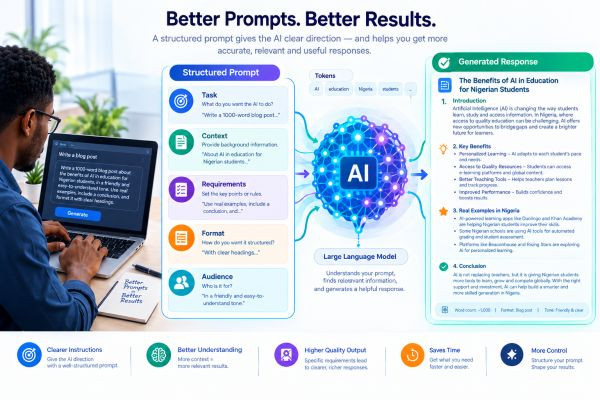
The Five Basic Parts of a Good Prompt
There isn't one universal formula that works for every AI system.
However, beginners can often improve their prompts by thinking about five basic elements:
- Task
- Context
- Requirements
- Format
- Audience
Let's examine each one.
1. Task: What Do You Want the AI to Do?
Start by making the main task clear.
Common task instructions include:
- Explain
- Summarize
- Rewrite
- Compare
- Brainstorm
- Analyze
- Translate
- Create
- Organize
- Extract
- Generate
For example:
"Summarize this article."
is clearer than:
"This article."
If you want a specific outcome, say so.
Instead of:
"Marketing ideas."
Try:
"Generate ten marketing ideas for a small online learning platform."
2. Context: What Does the AI Need to Know?
Context provides background information.
Suppose you ask:
"Write an email."
The AI doesn't know who the email is for, why you're sending it, or what you want to say.
You could provide context:
"I'm contacting a potential business partner about a collaboration between our online learning platform and their training organization."
Now the task becomes much clearer.
Context can include:
- Background information
- Your goal
- The situation
- Existing material
- Important facts
- Relevant constraints
The AI can only work with the information available to it and the capabilities of the system you're using.
3. Requirements: What Should the AI Include or Avoid?
Requirements tell the AI what the finished output should contain.
For example:
"Include three practical examples."
Or:
"Use simple language."
Or:
"Keep it below 800 words."
Or:
"Do not use technical jargon unless you explain it."
Requirements can make an otherwise vague request much more precise.
4. Format: How Should the Answer Look?
Sometimes the information is correct, but the format isn't useful.
You can tell the AI how you want the result structured.
For example:
"Give me the answer as a table."
Or:
"Use five bullet points."
Or:
"Create a step-by-step guide."
Or:
"Write it as a professional email."
Or:
"Give me a headline followed by a short introduction and five sections."
Format instructions are particularly useful when you already know how you intend to use the output.
5. Audience: Who Is the Content For?
This is one of the most useful details you can provide.
The same subject can be explained very differently depending on the audience.
Compare:
"Explain machine learning."
with:
"Explain machine learning to a teenager who has never studied computer science."
Or:
"Explain machine learning to a business manager who wants to understand how it could affect their company."
The topic is the same.
The audience is different.
That changes the appropriate vocabulary, examples and level of detail.
Prompt Examples: Weak vs Clear
Here are some simple comparisons.
Example 1: Learning
Basic prompt:
"Teach me Excel."
Clearer prompt:
"Create a beginner-friendly seven-day plan for learning Microsoft Excel. Focus on formulas, formatting, sorting, filtering and basic data analysis. Give me a practical exercise for each day."
Example 2: Writing
Basic prompt:
"Write an article about AI."
Clearer prompt:
"Write a beginner-friendly article explaining what generative AI is. Use simple language, practical examples and clear headings. Explain both its benefits and limitations."
Example 3: Programming
Basic prompt:
"Fix this code."
Clearer prompt:
"Review the Python code below. Identify the likely cause of the error, explain it in simple terms, and provide a corrected version. Also explain what you changed."
Example 4: Business
Basic prompt:
"Give me business ideas."
Clearer prompt:
"Give me ten online business ideas that can be started with relatively low initial costs. For each idea, explain the target customer, how it could make money and one major challenge."
Does a Prompt Need to Be Long?
No.
This is an important point.
Some tasks require detailed instructions.
Others don't.
If you ask:
"What is the capital of Japan?"
you don't need a 500-word prompt.
A simple question is enough.
But if you're asking an AI to produce a detailed business report, analyze a document or create a specific piece of content, additional context may be helpful.
The principle is:
Use enough information to make the task clear, but don't add unnecessary complexity.
What Is Prompt Context?
Context is the information surrounding your request that helps the AI interpret what you want.
For example:
"Rewrite this."
is ambiguous.
Rewrite it how?
For whom?
Why?
Now add context:
"Rewrite the following paragraph so it sounds professional and clear. The audience is potential customers of an online learning platform."
The second prompt gives the AI a better understanding of the task.
Context can come from the current prompt, earlier conversation messages, uploaded information, or other information supplied by the application.
Can You Give AI an Example?
Yes.
Providing an example can be a very effective way to communicate the desired output.
Suppose you want product descriptions written in a particular style.
Instead of explaining the style in several paragraphs, you could provide an example:
"Use this example as a guide for structure and tone: [example]. Now create a similar description for the following product."
The example demonstrates what you mean.
This approach is often called few-shot prompting when examples are included to guide the model.
You don't need to memorize the technical term to use the technique.
The basic idea is simply:
Show the AI what you mean.
What Is Zero-Shot Prompting?
Zero-shot prompting means asking an AI model to perform a task without giving it examples of the desired output.
For example:
"Classify this review as positive, neutral or negative."
No examples are provided.
The model attempts the task based on the instruction and its learned capabilities.
This can work well for many straightforward tasks.
What Is Few-Shot Prompting?
Few-shot prompting involves giving the model a small number of examples before asking it to perform the task.
For example:
Example 1:
Input: "The service was excellent."
Output: PositiveExample 2:
Input: "The product arrived late."
Output: NegativeNow classify: "The product works well but delivery was slow."
The examples help communicate the expected pattern.
This can be useful when the task has a particular format or classification style.
What Is Role Prompting?
You may have seen prompts such as:
"Act as a marketing expert."
or:
"Act as a programming tutor."
This is sometimes called role prompting.
The idea is to give the AI a role or perspective that can influence how it approaches the task.
For example:
"Act as a patient programming tutor. Explain this Python error to someone who has never programmed before."
This combines a role with a specific task and audience.
However, simply assigning a fancy title does not automatically make the AI an actual expert.
The quality of the response still depends on the model, the information available, the task and the quality of the interaction.
What Are Constraints in Prompting?
A constraint is a rule or limitation you give the AI.
Examples include:
- Maximum word count
- Number of examples
- Required structure
- Reading level
- Tone
- Specific information to include
- Information to avoid
- Output format
For example:
"Explain compound interest in no more than 300 words, using one numerical example and no technical jargon."
That's much more precise than:
"Explain compound interest."
What Is Iterative Prompting?
You don't always need to write the perfect prompt on your first attempt.
In fact, one of the easiest ways to work with AI is to iterate.
For example:
First prompt:
"Write an article about freelancing."
The response may be too generic.
You can follow up:
"Make it more practical and focus on beginners."
Then:
"Add a section about finding your first client."
Then:
"Rewrite the introduction so it sounds more conversational."
You're gradually refining the output.
This is often more practical than trying to create an enormous prompt containing every possible instruction from the beginning.
Why Does AI Sometimes Ignore Part of a Prompt?
Even a detailed prompt does not guarantee a perfect response.
An AI system may misunderstand:
- An ambiguous instruction
- Conflicting requirements
- Complex formatting
- Important context
- The intended meaning of a phrase
A prompt can also contain too many instructions that compete with one another.
For example:
"Make this extremely detailed, but keep it under 100 words."
Those requirements may conflict.
Clear prompts reduce ambiguity.
They don't eliminate the possibility of errors.
What Is Prompt Chaining?
Prompt chaining means breaking a complex task into multiple steps rather than asking the AI to do everything at once.
Imagine you want to create a long educational article.
Instead of saying:
"Research, write, edit, fact-check and optimize this entire article."
you could break the process into stages:
Step 1: Generate possible topics.
Step 2: Select and structure the topic.
Step 3: Create an outline.
Step 4: Draft each section.
Step 5: Review the draft for gaps.
Step 6: Improve clarity.
Step 7: Create the final version.
Breaking complex tasks into smaller stages can make the workflow easier to review and control.
Can Better Prompts Make AI More Accurate?
Better prompts can make the task clearer, which can improve the relevance and usefulness of the output.
But a better prompt does not guarantee factual accuracy.
For example, you can write an extremely detailed prompt asking for historical information, and the model may still produce an incorrect date.
That's why prompting and fact-checking are separate skills.
A good prompt helps you get a better-targeted response.
Verification helps determine whether the response is actually correct.
What Should You Avoid Putting Into AI Prompts?
Be thoughtful about the information you provide to an AI system.
Avoid sharing sensitive information unless you understand how the particular service handles it and you have a legitimate reason to provide it.
Depending on the situation, this can include:
- Passwords
- Private financial information
- Personal identification information
- Confidential business documents
- Private communications
- Other sensitive data
The exact privacy protections vary between AI services, so users should review the relevant service's policies and settings.
Prompting Is Not Just About Getting More Words
A common mistake is assuming that a "good prompt" means asking AI to produce an enormous response.
It doesn't.
A useful prompt is one that produces an output appropriate for the task.
Sometimes the best prompt is:
"Summarize this in five bullet points."
Sometimes it's:
"Analyze this business proposal, identify its three strongest assumptions and list questions I should investigate before making a decision."
The objective is not maximum output.
The objective is useful output.
A Practical Prompt Formula for Beginners
If you're not sure where to start, try this simple structure:
Task + Context + Requirements + Format + Audience
For example:
"Create a beginner-friendly article about personal budgeting. The readers are young adults who are new to managing money. Explain the difference between needs and wants, show a simple monthly budgeting example, and keep the language straightforward. Use clear headings and practical examples."
You don't have to follow this formula word for word.
Think of it as a checklist.
Before sending your prompt, ask:
- What do I want?
- What does the AI need to know?
- What should the result include?
- How should it be presented?
- Who is it for?
If you can answer those questions, your prompt will usually be much clearer.
10 Practical Prompting Tips for Beginners
1. Be specific
Tell the AI exactly what you want.
2. Give relevant context
Don't make the system guess important details.
3. Define the audience
Explain who will read or use the output.
4. Specify the format
Tell it whether you want paragraphs, bullet points, a table, an outline or something else.
5. Give examples when useful
Showing the desired pattern can be easier than describing it.
6. Set realistic constraints
Specify word counts, sections or other requirements when they matter.
7. Break complicated tasks into steps
Don't force every task into one enormous prompt.
8. Review the output
A well-written answer can still contain errors.
9. Ask follow-up questions
Treat the interaction as a process rather than a single request.
10. Refine your prompt
If the result isn't useful, identify what was missing and improve the next instruction.
Common Prompting Mistakes
Even experienced users make prompting mistakes.
Here are some of the most common.
Being too vague
"Tell me about business."
What type of business?
For whom?
For what purpose?
Giving conflicting instructions
"Make it extremely detailed but only 100 words."
The AI has to balance competing requirements.
Leaving out important context
The AI may have to guess information that you could have provided.
Expecting perfect accuracy
A clear prompt doesn't turn an AI model into an infallible authority.
Adding unnecessary instructions
More instructions aren't always better.
Failing to review the result
Even a strong response should be checked when accuracy matters.
Do You Need Prompt Engineering to Use AI?
No.
You can use AI effectively without becoming a prompt-engineering specialist.
For everyday tasks, simple natural-language instructions can work extremely well.
Prompt engineering becomes more useful when you're trying to achieve consistent results, automate workflows, build AI applications, or solve more complicated tasks.
For beginners, the most important skill is not memorizing complicated prompt formulas.
It's learning how to communicate clearly with AI.
AI Prompting and Human Thinking
There is another important side to prompting that is sometimes overlooked.
Writing a good prompt requires you to understand what you actually want.
If you cannot clearly define the task, audience or desired outcome, the AI has little chance of consistently producing exactly what you need.
In that sense, prompting can encourage better thinking.
Before asking AI:
"What should I do?"
you might instead ask:
Artículos relacionados